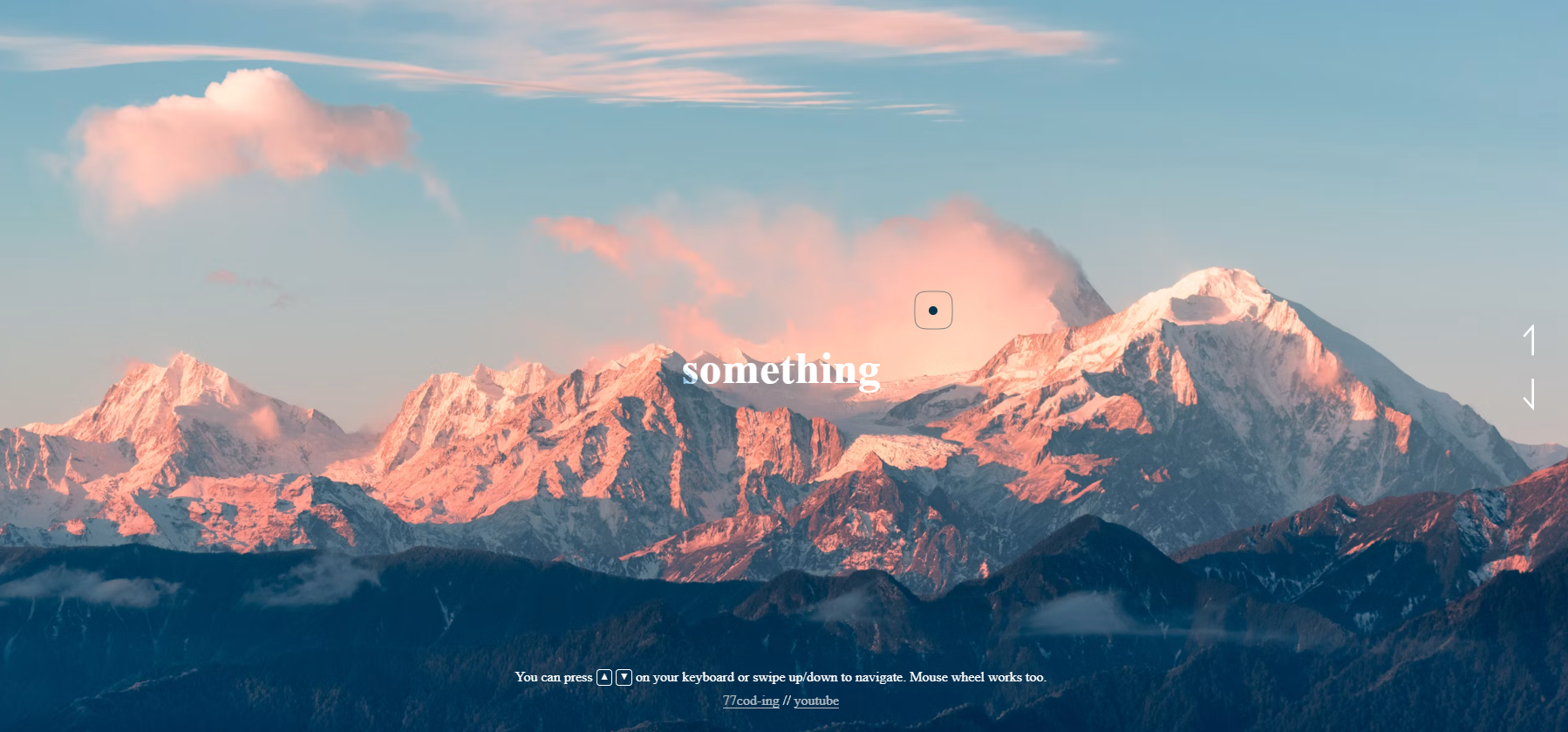
What You'll Build
In this tutorial, you'll build an advanced JavaScript image slider entirely from scratch — one external library (GSAP via CDN), no build tools, no frameworks. The result is a fullscreen interactive image gallery with cinematic split-panel transitions, a physics-inspired custom cursor, and support for keyboard arrows, touch swipe, and mouse wheel inputs.
The design splits the viewport into three equal columns. When navigating to the next or previous image, each column animates vertically — some going up, some going down — creating a staggered checkerboard wipe that reveals the new image. This is a real-world JavaScript UI animation project that demonstrates the power of vanilla JS combined with GSAP's professional easing curves.
This project is ideal if you want to practice GSAP Power4 easing, linear interpolation for smooth cursor motion, dynamic DOM generation, and multi-input event handling in one visually striking project.
Key Features of This Image Slider
Power4.easeInOut for a cinematic wipe effect.
lerp() inside requestAnimationFrame.mix-blend-mode: difference makes the cursor automatically
invert
against any image color — always visible, always stylish.playing boolean flag prevents new transitions from
firing until the
current GSAP animation completes.new Image() so
every
transition is instant with zero loading delay.Full Source Code (Free)
The project lives in a single HTML file. The CSS handles the layout, cursor styling, and
overflow: hidden clipping for the panel animation. The JavaScript manages
image data, DOM generation, GSAP transitions, and all input event listeners.
Use the tabs to explore each section.
🔓 Full Source Code unlocks in
Hosted on GitHub Gist — free, no sign-up required
index.html file.
The GSAP library is loaded via CDN — no npm, no build tools needed.
Open the file in any modern browser and the slider runs immediately.
How It Works — Step by Step
Here's a breakdown of the eight core techniques behind this interactive image slider, from image data setup to multi-input event handling.
Minimal HTML + Dynamic DOM Generation
The HTML contains only a #main container. JavaScript dynamically
generates all .part column divs, .section wrappers,
and <img> elements. This keeps the markup clean and
centralizes all slider logic in JavaScript — a scalable pattern for real-world projects.
Image Preloading
All images are preloaded immediately on script execution using
new Image().src = url. This forces the browser to cache each
image so that when a transition fires, the new image appears instantly
without any loading flicker or delay.
Split-Panel Column Layout
Three equal-width .part columns are created via a loop.
Each column's image is positioned absolutely at
left: calc(-100vw / cols * colIndex),
making all columns show the same image. The overflow: hidden on
.section clips each column independently, enabling the split wipe effect.
GSAP Transition Logic with Stagger Direction
The go(dir) function drives all navigation. A new .section
element with the next image is either appended (for upward) or prepended (for downward)
to each column. GSAP then animates the column's Y position. The direction alternates
per column based on (colIndex - Math.max(0, dir)) % 2, creating the
checkerboard stagger that defines the visual signature of this slider.
Custom Lerp Cursor
Two cursor elements are created: .cursor (sharp dot) and
.cursor-f (circular follower). The dot snaps to the exact mouse
position on every mousemove event. The follower position is
updated via lerp(current, target, 0.16) inside a
requestAnimationFrame loop — moving 16% of the remaining
distance per frame for the characteristic elastic lag.
mix-blend-mode: difference
Both cursor elements use mix-blend-mode: difference in CSS.
This blending mode subtracts the cursor's white color from the background,
producing an automatic inversion — appearing dark on light image areas and
bright on dark areas. No JavaScript color detection is needed; CSS handles
it entirely in the compositor.
Click & Touch Cursor Scale Animation
On mousedown or touchstart, GSAP animates the dot
cursor to scale: 4.5 and the follower to scale: 0.4,
creating a satisfying press animation. Both reset on mouseup /
touchend. On touch devices, both cursors are hidden entirely via
'ontouchstart' in window detection.
Multi-Input Navigation Wiring
Three input types trigger go(): keyboard
keydown events check for arrow keys; touch events record
startY on touchstart and fire
go() if the swipe distance exceeds 40px on touchend;
wheel events use clearTimeout debouncing to fire only once
per scroll gesture, mapped by deltaY sign.
playing flag is critical. Without it, rapid
keyboard or scroll inputs would stack multiple GSAP animations, causing columns to desync and
the slider to break. Always check if (!playing) before starting a transition and
set playing = false only after the last animation's .then() resolves.
Animation Technique Comparison
This project touches several powerful CSS and JavaScript animation techniques. Here's how they compare — helping you choose the right tool for your next responsive JavaScript image transition or interactive website animation project.
| Technique | Used In This Project | Performance | Use Case |
|---|---|---|---|
| GSAP gsap.to() | Yes | Excellent | Complex multi-element timeline animations, professional easing curves |
| CSS Transitions | No | Excellent | Simple hover states, single-property changes; limited easing options |
| CSS @keyframes | No | Excellent | Looping ambient animations; less flexible for dynamic start/end values |
| requestAnimationFrame | Yes (cursor lerp) | Excellent | Frame-by-frame custom math animations like lerp, spring physics |
| Web Animations API | No | Good | Native browser animation without libraries; less browser support |
| setInterval / setTimeout | Avoid | Poor | Not synced to display refresh; causes jank; use rAF instead |
requestAnimationFrame complement each other
perfectly.
GSAP excels at orchestrated multi-element transitions with rich easing. rAF shines for
continuous per-frame math like the lerp cursor — where you need full control over the interpolation
formula.
See the Neon Digital Clock tutorial for
another
deep
dive into requestAnimationFrame patterns.
JavaScript & CSS Concepts Used
This project covers these intermediate-to-advanced web development techniques:
- GSAP Power4.easeInOut — Professional cinematic easing for multi-element transitions that feel weighty and satisfying.
- Linear Interpolation (lerp) — Mathematical formula
(1-t)*a + t*bused to create smooth elastic cursor following without spring physics libraries. - Dynamic DOM Generation — All slider columns, sections, and images created programmatically from a data array — zero hardcoded HTML.
- CSS mix-blend-mode: difference — GPU-composited blending that inverts the cursor color based on the background, always ensuring visibility.
- CSS overflow: hidden Clipping — Each column clips its content independently, enabling the split-panel wipe without any JavaScript clip calculations.
- requestAnimationFrame Loop — Smooth cursor animation loop that runs at display refresh rate (typically 60fps), ensuring buttery motion.
- Event Handling: keydown, wheel, touch — Three distinct input paradigms unified
into a
single
go(dir)API for clean, DRY navigation code. - Animation Lock Pattern — Boolean flag
playingprevents animation stacking — a critical production pattern for any JavaScript slider or carousel. - Image Preloading — Proactive browser cache priming using
new Image()for zero-delay transitions.
For more JavaScript animation patterns, check out the
CSS Neon Digital Clock tutorial
(deep requestAnimationFrame usage) and the
Neon Cursor Animation project
(advanced cursor effects). For GSAP-powered button animations, see the
Animated Button with Star Effects.
Frequently Asked Questions
How do I build an animated image slider using JavaScript and GSAP?
.section
with the
target image, append or prepend it to the column, then use gsap.to() to animate
the column's Y position by ±window.innerHeight. Alternate direction per column
for the stagger effect. Full source code is in the tabs above.
What is GSAP and why use it for JavaScript animations?
Power4.easeInOut, promise-based completion callbacks
via .then(), and cross-browser consistency far more reliably than CSS
transitions.
For the split-panel slider effect, GSAP reduces code complexity dramatically — what would
require dozens of lines of manual rAF math is a single gsap.to() call.
How does the custom cursor with mix-blend-mode work?
mousemove, and a larger circular follower with a smooth lag via
lerp()
in a requestAnimationFrame loop. Both use
mix-blend-mode: difference
in CSS — this inverts their white color against whatever background is underneath, appearing
dark on white areas and bright on dark images automatically.
What is linear interpolation (lerp) and how is it used in cursor animation?
lerp(a, b, t) = (1 - t) * a + t * b. In this project, on every animation frame
the cursor follower moves 16% (t = 0.16) of the remaining distance to the real
mouse
position. Because the gap shrinks each frame, the follower decelerates as it approaches —
creating a natural elastic drag effect without any physics library.
How does the swipe and keyboard navigation work?
go(dir) function.
Keyboard: ArrowDown/ArrowRight →
go(1);
ArrowUp/ArrowLeft → go(-1).
Touch: touchstart records startY;
touchend
fires go() if the swipe delta exceeds 40px.
Wheel: events are debounced with clearTimeout and direction
is determined by the sign of e.deltaY.
Is this image slider project suitable for beginners?
Can I use this image slider in a real website or portfolio?
images array with your own URLs, change the cols variable for a
different number of panels, and adjust the GSAP duration and
ease to match your brand's feel. The cursor can be disabled for traditional
pointer interfaces by removing the cursor elements.
Conclusion
This advanced JavaScript image slider demonstrates what's possible when vanilla JavaScript and GSAP work together. By combining dynamic DOM generation for the split columns, GSAP Power4 easing for the cinematic wipe transitions, linear interpolation for the elastic cursor, and multi-input navigation for keyboard, touch, and scroll — you get a production-quality interactive image gallery with zero framework overhead.
The techniques here — animation lock patterns, lerp-based motion, mix-blend-mode
compositing, and input event abstraction — are the same tools used in real-world creative
agency websites and award-winning frontend projects. Master them here, then apply them everywhere.
Want to go deeper into JavaScript animation? Explore the
Neon Digital Clock for
requestAnimationFrame patterns, the
Neon Cursor for advanced
cursor effects, or the Animated Button
for GSAP micro-interactions.
Found this useful? Explore more HTML CSS JavaScript projects in the sidebar.