What You'll Build
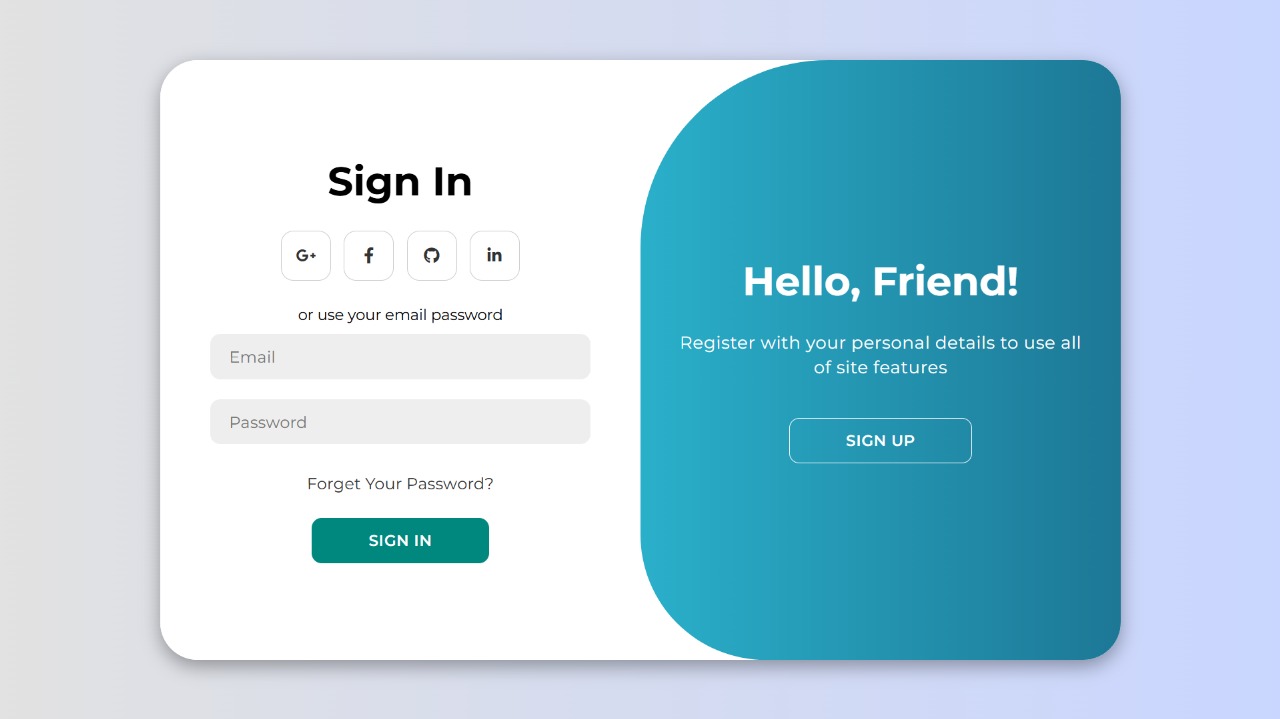
This tutorial walks you through creating a modern animated login and signup page using only HTML, CSS, and a small amount of JavaScript. The result is a clean, professional two-in-one authentication interface where signing in and signing up happen within the same page — no navigation, no page reload, just a smooth animated transition between the two panels.
The design uses a sliding gradient panel that moves horizontally to reveal either the login or the signup form. Combined with hover button effects, clean input styling, and a fully responsive layout, this pattern is immediately recognized by users as a modern, polished authentication experience.
HTML to structure two form containers
and a toggle panel, CSS transitions and transforms to animate the
sliding gradient, and JavaScript to add or remove an active class
on the container — triggering all the CSS animations instantly.
Key Features of This Login & Signup Page
transform,
creating the illusion of flipping between two entirely different pages.#38e8ff to #1d7896
gives the toggle panel a cool, professional blue glow effect.background-size transitions — a subtle but impressive detail.
How It Works — Step by Step
Here's a breakdown of the three core layers that power this animated login and signup page.
Structure with HTML
Create a wrapper <div class="container"> that holds two form sections —
one with class sign-in and one with class sign-up. Inside each,
place your input fields and submit button. A separate toggle-container div sits
alongside the forms and holds the animated gradient panel plus the two toggle buttons.
The key is that both forms share the same container, so the toggle animation feels seamless
rather than navigating to a new page.
Animate with CSS
The magic lives in CSS. Using position: absolute and transition,
both form panels occupy the same space. The .toggle background panel uses a
linear-gradient and starts covering the right half of the container. When
the container receives the .active class, transform: translateX()
slides the gradient panel to the left — revealing the signup form underneath and hiding
the login form. Buttons use background-size with a transition
for the fill-from-bottom hover effect.
Toggle with JavaScript
The JavaScript is intentionally minimal — just two event listeners on the toggle buttons.
Clicking the Sign Up button calls
container.classList.add('active'); clicking Sign In calls
container.classList.remove('active'). These single class changes trigger
every CSS transition defined for the .container.active state — the sliding
panel, form visibility changes, and all position transforms fire automatically.
Polish the Final Result
The finished product is a responsive login/signup interface with smooth 600ms sliding transitions, gradient highlights, and interactive hover effects on every button. It feels professional and fresh — perfectly suited for SaaS platforms, portfolios, or any creative web application where the login experience should match the quality of the rest of the UI.
active class is the key. All animation state
lives in CSS — JavaScript only adds or removes the single active class. This keeps
the JS lightweight and makes the animation logic easy to debug, customize, or extend.
Never put animation values directly in JavaScript when CSS transitions can handle them.
Understanding the CSS Sliding Mechanism
Both form panels use position: absolute and width: 50% within the
container. By default, the sign-in form is visible on the left, and the sign-up form is hidden
on the right (or vice versa depending on your layout). When .container.active is
applied, a transform: translateX(100%) shifts the sign-in panel out of view while
translateX(0) brings the sign-up panel into the visible area — all animated
smoothly via CSS transition: all 0.6s ease-in-out.
Best Practices for Login Page Design
A great login page does more than authenticate — it builds trust. Keep the UI minimal and free
of visual clutter. Use a unified color palette (defined in CSS custom properties) to maintain
brand consistency across both panels. Ensure all inputs have appropriate type
attributes (e.g. type="email", type="password") for built-in browser
validation and mobile keyboard optimization. Add visible focus styles and sufficient color
contrast to meet accessibility standards.
Get the Source Code
The full source code is available for free on GitHub Gist. Explore the code below, copy it directly, or click Preview Result to see the live demo — then wait for the countdown to grab the full Gist link.
/* Loading source code... */// Loading source code...index.html and style.css,
place them in the same folder, and open index.html directly in your browser.
No server, no build tool, no npm install — the animated login page works instantly out of the box.
Frequently Asked Questions
How does the login/signup toggle animation work?
active class on the main container. All CSS selectors targeting
.container.active then fire simultaneously — sliding the gradient panel,
repositioning the form panels, and changing z-index values — producing the seamless
flip effect with zero JavaScript animation logic.
Does this design require any JavaScript frameworks?
classList.add and classList.remove). No React, no Vue, no jQuery,
no Tailwind, no build tools. It runs directly in the browser from a plain HTML file.
Is this login page design responsive?
flexbox and relative units throughout. On small screens,
the two-panel layout stacks vertically and the toggle panel adjusts accordingly. Input fields
and buttons are sized for comfortable touch interaction on mobile devices.
Can I customize the gradient colors?
.toggle rule using a
linear-gradient. Swap #38e8ff and #1d7896 for any
colors that match your brand. You can also move the gradient definition into CSS custom
properties for even easier theming across your entire project.
How do I connect this to a real backend?
action attribute with your API endpoint and add an event listener on form
submission to send credentials via fetch() or XMLHttpRequest.
The HTML structure — with separate sign-in and sign-up forms —
makes it straightforward to attach independent submit handlers to each.
Conclusion
The Modern Animated Login & Signup Page demonstrates how far pure CSS
transitions can take a user interface. By combining CSS class toggling
with transform, transition, and a well-structured HTML layout,
you get a production-ready animated authentication UI with almost no JavaScript and
zero external dependencies.
This technique is directly applicable to real projects: SaaS platforms, portfolios, landing pages, or any application where a polished login experience is part of the brand. Swap the gradient colors, adjust the transition timing, update the typography — all through CSS — and the design adapts to any visual identity in minutes.
Found this useful? Explore more HTML & CSS projects in the sidebar →