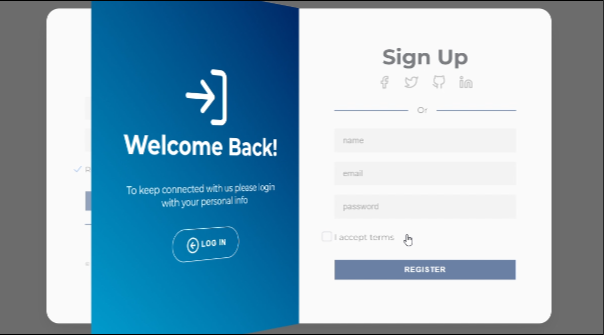
What You'll Build
In this tutorial, you'll create a 3D flip login and register interface using HTML for structure, CSS for 3D animations and styling, and JavaScript for interaction logic. The login and register forms are placed on the front and back of a card — when the user clicks "Register," the card flips 180 degrees along the Y-axis to reveal the sign-up form.
This project is ideal for mastering CSS 3D transforms, perspective, backface-visibility, transform-style: preserve-3d, and JavaScript class toggling — skills directly applicable to dashboards, SaaS applications, and modern authentication screens.
Key Features of This 3D Flip Interface
transform for the flip — no layout thrashing, no jank.prefers-reduced-motion, supports keyboard navigation, and maintains contrast./* Loading source code... */// Loading source code...How It Works — Step by Step
Here's exactly how each layer of this 3D flip interface is constructed, from the HTML structure down to the JavaScript toggle logic.
HTML Structure & Main Container
Create the HTML structure for the login and register forms inside a main wrapper with
#container. Separate the front (Login) and back (Register) panels into dedicated
elements. This structure acts as the base for the 3D flip animation and layout organization.
CSS Layout, 3D Scene & Animations
Use perspective on the parent container and transform-style: preserve-3d
on the flipping element to prepare the 3D scene. Apply keyframe animations or transitions to
rotate the panels along the Y-axis for a smooth flip effect. Add shadows, depth, and spacing
to enhance the 3D illusion.
JavaScript Interaction Logic
Use JavaScript to control the interaction flow: listen for clicks on the Register and Log In
buttons, toggle the active class to trigger the flip animation, toggle the
close class to return to the default state, and ensure smooth state transitions
without layout shifts.
UI Customization & UX Enhancements
Customize form inputs, buttons, and SVG icons to create a consistent visual language. Replace default checkboxes with custom-designed ones for better aesthetics. Improve focus states, hover effects, and error feedback to enhance usability and accessibility.
Backface Visibility & Panel Positioning
Apply backface-visibility: hidden to both panels so only the front-facing one is
visible at any time. The back panel starts with transform: rotateY(180deg) so it
appears correctly when the card flips. Proper z-indexing prevents rendering conflicts.
Responsive Testing & Cross-Device Support
Test the interface across multiple screen sizes and aspect ratios. Adjust spacing, font sizes, and container dimensions using media queries. Ensure that the 3D flip animation remains smooth on both desktop and mobile devices without visual glitches.
perspective property must be applied to the parent
of the flipping element, not on the element itself. A value between 800px and
1500px produces the most natural-looking 3D rotation for card-sized elements.
Benefits for UI Design & Front-End Projects
A 3D Flip Login Interface adds depth and interactivity to authentication screens. It reflects attention to micro-interactions, motion design, and modern front-end practices. When implemented correctly, it enhances user experience without sacrificing performance.
- Professional Look: Suitable for SaaS dashboards, web applications, and startup landing pages.
- Better User Experience: Smooth transitions between Login and Register reduce cognitive load.
- Scalable Component: Can be adapted to different layouts, themes, and color schemes.
- High Engagement: Users interact more with animated UI components, increasing form completion rates.
- Memorable Design: 3D interactions make the interface stand out from generic login pages.
Best Practices & Common Mistakes
- Set
perspectiveon the parent,preserve-3don the child - Use
backface-visibility: hiddenon both panels - Respect
prefers-reduced-motionto disable or simplify the flip - Ensure all form fields are keyboard-navigable
- Maintain sufficient color contrast for text and buttons
- Test on real mobile devices before deploying
- Apply 3D transforms without setting perspective on the parent
- Overuse heavy box-shadows that reduce rendering performance
- Force 3D animations on low-end devices without fallbacks
- Neglect responsive behavior for small screens
- Use
rotateYwithout hiding the backface — causes transparency overlap - Forget to pre-rotate the back panel by 180 degrees
transform: rotateY() — never animate properties like
width, height, top, or left during the transition.
Frequently Asked Questions
What is a 3D flip login interface?
Do I need JavaScript for the flip animation?
transform: rotateY(180deg) with
a transition. However, JavaScript is needed to toggle the active class when the user clicks
the Register or Log In button, since CSS alone cannot respond to click events without checkbox
hacks (which are less semantic and accessible).
How does CSS perspective work for 3D effects?
perspective property on a parent element defines how far the viewer is from
the 3D scene. A smaller value (e.g., 1000px) creates a dramatic perspective with
strong foreshortening; a larger value makes it subtler. Combined with
transform-style: preserve-3d on the child, it allows rotateY to
produce a real 3D rotation rather than a flat skew.
Is this 3D login form accessible?
<label> elements,
the flip can respect prefers-reduced-motion by disabling the rotation, and keyboard
navigation should work for all interactive elements. The back panel should use
backface-visibility: hidden and appropriate z-index to remain accessible to
assistive technology.
Can I connect this login form to a real backend?
<form>,
<input>, and <button> elements. You can add
action and method attributes to the forms or use JavaScript
fetch() to send form data to any backend API — Firebase, Node.js, PHP, Python, etc.
How do I change the flip direction?
transform: rotateY(180deg) — which is what
this tutorial uses. To flip vertically (top-bottom), change it to
rotateX(180deg) and adjust the perspective origin accordingly. You may also need
to update which panel is initially rotated and how backface-visibility is applied.
Conclusion
The 3D Flip Login Interface with HTML, CSS, and JavaScript combines structure, motion, and interaction design into a polished authentication component. By organizing the HTML properly, enabling 3D with CSS perspective and transforms, and controlling state with JavaScript class toggling, you get a reusable, professional front-end pattern.
When optimized for performance (GPU-accelerated transforms only) and accessibility
(prefers-reduced-motion, keyboard support, proper contrast), this component
is ready for production use in SaaS dashboards, startup landing pages, and any application
that needs a modern authentication screen.
Found this useful? Explore the related projects in the sidebar for more modern CSS and JavaScript UI effects.