What You'll Build
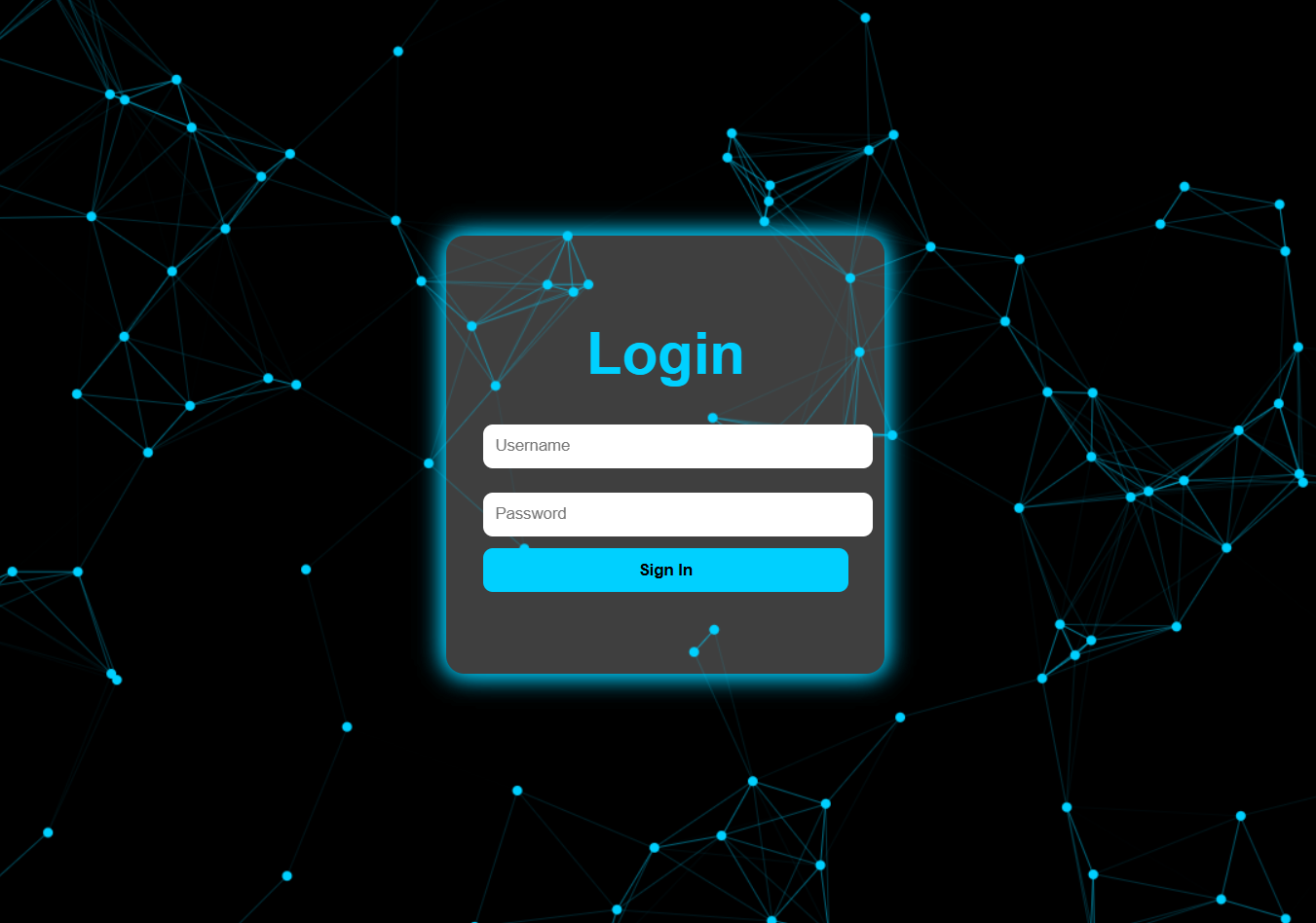
In this tutorial, you'll create a particles login page using HTML for structure, CSS for glassmorphism styling, and Particles.js for the animated background. The result is a futuristic login interface where interactive particles float behind a frosted-glass form.
This project is ideal for learning Particles.js integration, CSS backdrop-filter, neon box-shadow effects, and responsive login form design — skills directly applicable to portfolios, tech startups, SaaS apps, and any website needing a modern authentication screen.
Key Features of This Particles Login Page
backdrop-filter: blur() and semi-transparent background create a
frosted glass effect./* Loading source code... */// Loading source code...How It Works — Step by Step
Here's exactly how each layer of this particles login page is constructed, from the HTML structure down to the Particles.js configuration.
Structure the HTML
Create a div with id="particles-js" as the animation canvas,
and a separate .login-box container for the form. The form contains input fields
for username and password, plus a submit button. Both elements sit inside a full-viewport wrapper
so the particles fill the entire background.
Add CSS Glassmorphism Styling
Set body background to dark for maximum contrast against the particles.
Apply backdrop-filter: blur(12px) and a semi-transparent
background: rgba() on the login box for the glassmorphism effect.
Add box-shadow with a neon cyan color to make the form glow.
Style input fields with padding, border-radius, and smooth focus transitions.
Implement Particles.js
Include Particles.js via CDN and call particlesJS() with a configuration object.
Set the particle count, color, size, movement speed, and line linking options.
Enable interactivity via hover and click events to make particles
react to the user's mouse — making the interface feel alive.
particles.number.value to 80 or lower
for mobile devices. Too many particles on low-end hardware can cause frame drops and drain battery.
Use a media query or a JS check for window.innerWidth to reduce the count automatically.
Benefits for UI Design & Front-End Projects
A particles login page immediately sets a professional, tech-forward tone for any website. The combination of animated depth and glassmorphism keeps the interface visually rich without sacrificing usability or form readability.
- Modern Design: Creates a futuristic, high-tech look ideal for SaaS apps, dashboards, and portfolios.
- Interactive Feel: Subtle particle motion in the background makes the interface feel alive and engaging.
- Readable Form: The glassy login box ensures input fields remain clear and accessible against the animated background.
- Customizable: Particle color, size, speed, and count are all configurable via a simple JSON object.
- Memorable: Users are more likely to remember and return to sites with distinctive visual experiences.
Best Practices & Common Mistakes
- Reduce particle count on mobile for smooth performance
- Use
position: absoluteon#particles-jsso it fills the background - Label all input fields properly for accessibility
- Keep contrast high between text and the glassy form
- Match particle color with your site's accent color
- Test on real mobile devices before deploying
- Use too many particles — it reduces readability and performance
- Make particles move too fast — it becomes distracting
- Use a bright background — low contrast hides the particles
- Forget mobile responsiveness — box must stay centered
- Use too many colors — keep the particle palette minimal
- Neglect to optimize particle count for performance
@media (prefers-reduced-motion: reduce) by reducing or disabling
particle animation for affected users.
Frequently Asked Questions
What is a particles login page?
What is Particles.js?
How does glassmorphism work in CSS?
backdrop-filter: blur() with a
semi-transparent background (rgba()), a subtle border, and a soft
box-shadow. This creates the illusion of frosted glass layered over the
animated particle background behind it.
Can I connect this login form to a real backend?
<form>, <input>,
and <button> elements. You can add action and method
attributes, or use JavaScript fetch() to send form data to any backend —
Firebase, Node.js, PHP, Python, and more.
Is Particles.js free to use?
cdn.jsdelivr.net or cdnjs) or download it from the official
GitHub repository at github.com/VincentGarreau/particles.js.
How do I change the particle color?
particles.color.value to any
hex color, for example "#00d9ff" for cyan or "#ff6b35" for orange.
You can also set it to "random" to generate multi-colored particles automatically.
Conclusion
The Particles Login Page with HTML, CSS, and JavaScript combines aesthetic appeal with usability. Particles.js delivers the animated background with minimal performance overhead, while CSS glassmorphism keeps the login form clean, readable, and visually striking.
When optimized for mobile (reduced particle count) and accessibility (prefers-reduced-motion,
proper labels, sufficient contrast), this component is fully production-ready — ideal for portfolios,
tech startups, apps, or any site that wants a modern login experience.
Found this useful? Explore the related projects in the sidebar for more modern CSS and JavaScript UI effects.